Hexo 的自动部署
目前的主流方式:
- Travis CI:travis-ci.org 专门针对开源项目,Github 上所有的公开仓库都能够免费使用;travis-ci.com 针对私有及商业项目,新用户前 100 次构建是免费的,后面就要收费了。现在 github 私有库已经免费了!!!
- Githooks: 这个如果 vps 本地部署,配合 nginx ,还是很推荐的
- Github Actions: 持续集成,自动执行软件开发工作流程
说明
前一阵玩docker的时候用docker搭建了Hexo环境,感觉像Hexo的环境搭建使用docker好笨重
本次使用的是Github Actions,就是因为其简单、无需 VPS、公有仓库免费、私有仓库每个月 2000 分钟、还能体验这个新功能,本文采用的是API推送的方式,免去需要物理机申请 ssh key 的步骤,如果习惯了采用SSH方式,你可以去看看我的另外一篇文章Github Actions 通过 SSH 自动部署 Hexo。
静态网站部署其实哪家的 Pages 都可以,可以是 github page、gitlab、coding、gitee、vps 等等,这里以 github 和 coding 举例。
环境准备
流程:博客源码通过本地git备份到blog库,Github Actions监控github的PUSH会自动进行部署,发布到Github Pages和Coding Pages
- 私有仓库: blog
这里是存放 Hexo 博客源码的
- 公有仓库: 用户名.github.io
这里是用来 public 静态页面的 Pages 仓库
- 公有仓库: 用户名.coding.me
这里是用来 public 静态页面的 Pages 仓库
所以如果你还没有创建 Hexo ,请参考 官方快速开始文档
API 密钥申请
github 申请
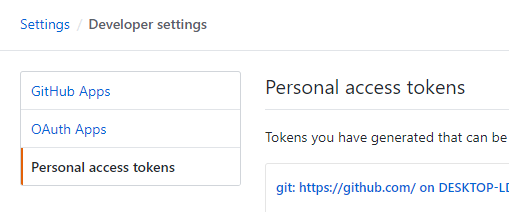
- 路径:Settings –> Developer settings –> Personal access tokens –> Generate new token
- 勾选
repo所有的权限,即 repo:status、repo_deployment、public_repo 和 repo:invite - 可参考GitHub API 和 OAuth scopes 权限说明
这里的
token只显示一次,请先保存下来在关闭网页,否则只能重新生成
coding 申请
最近 coding 和腾讯云开发者合并为全新 coding,有好多的变化,我是 2020 年 01 月 19 日升级的,这里我以全新 coding 来说明,对于推送和拉取只有格式的区别.截至目前我只有 coding 的升级了腾讯云开发者的还没有升级。
- 路径:个人设置 –> 访问令牌 –> 新建令牌
- 勾选
project:depot权限,即完整的仓库控制权限,可读可写 - 可参考Coding API 和 OAuth scopes 权限说明
这里的
token只显示一次,请先保存下来在关闭网页,否则只能重新生成,这里还有一个令牌用户名需要记下来,最好用这个替换coding用户名操作
API 密钥添加
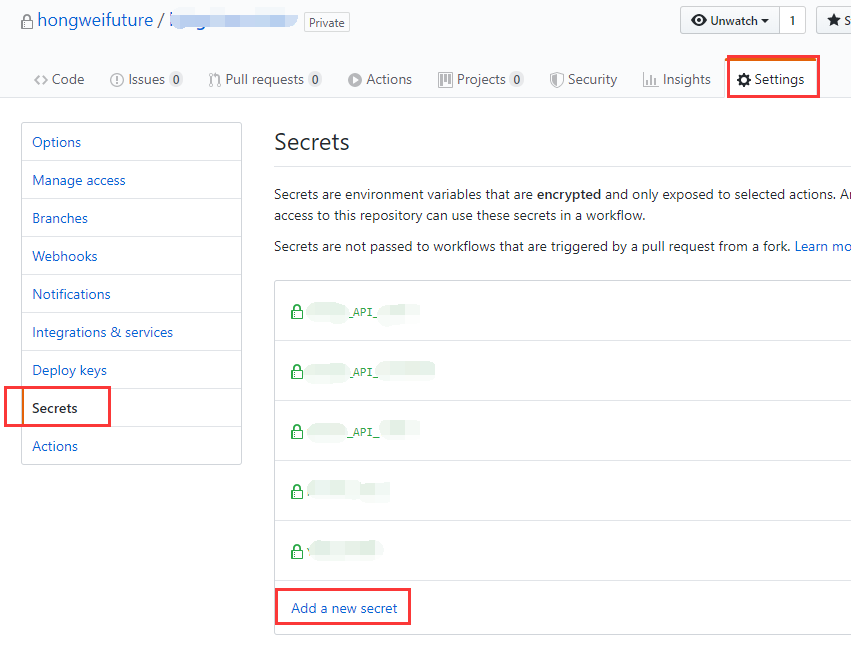
- 配置仓库私钥,blog 私有仓库的 Settings –> Secrets 里添加私钥
Secrets,以下面名称命名,输入对应的值 - token_CodingAPI
- token_GithubAPI
- Username_Coding
配置 GitHub Actions
GitHub Actions 有一些自己的术语。
- workflow (工作流程):持续集成一次运行的过程,就是一个 workflow。
- job (任务):一个 workflow 由一个或多个 jobs 构成,含义是一次持续集成的运行,可以完成多个任务。
- step(步骤):每个 job 由多个 step 构成,一步步完成。
- action (动作):每个 step 可以依次执行一个或多个命令(action)。
在 blog 仓库的 Actions 选项卡下点击新建 workflow,名称默认或者自定义修改,编写如下配置。
这里需要注意一下,两种情况
- 如果你的 Pages 仓库是
空的,没有进行过初始化和任何操作,请执行**第一次运行**和**第二次及以后运行** - 如果你的 Pages 仓库
不是空的,也就是说有内容,或者说你现在只是在现有的 Pages 仓库中进行升级,那就只运行**第二次及以后运行** - 说明:
**第一次运行**和**第二次及以后运行**只有分支操作的区别,其他无区别,第一次有 -b,*第二次没有
git checkout master:切换分支git checkout -b master:创建并切换分支
第一次运行
我的Github和Coding的git信息一样,如果你不一样,请分开写,空仓库第一次是git checkout -b master
# workflow name
name: CI Hexo Blog Deploy First

# master branch on push, auto run
on:
  push:
    branches:
      - master

jobs:
  Deploy-Pages:
    name: Deploy Hexo Public To Pages
    runs-on: ubuntu-latest

    steps:
      # check it to your workflow can access it
      # from: https://github.com/actions/checkout
      - name: Checkout Repository master branch
        uses: actions/checkout@master

      # from: https://github.com/actions/setup-node
      - name: Setup Node.js 10.x
        uses: actions/setup-node@master
        with:
          node-version: "10.x"

      - name: Setup Git Infomation
        run: |
          git config --global user.name '用户名'
          git config --global user.email '邮箱'

      - name: Get Latest Commit Message
        run: |
          git log --pretty=format:"%s from Github Actions at `date +"%Y-%m-%d %H:%M:%S"`" --date=short -n 1  > commit-message.log

      - name: Setup Hexo Dependencies
        run: |
          npm install hexo-cli -g
          npm install

      - name: Generate public files
        run: |
          hexo clean
          hexo generate

      - name: Deploy To Github Pages
        env:
          Github_Pages: github.com/用户名/用户名.github.io
          Github_Token: ${{ secrets.token_GithubAPI }}
        run: |
          git clone https://${Github_Pages} .github_pages
          cd .github_pages
          git checkout -b master
          cd ../
          mv .github_pages/.git/ ./public/
          cd ./public/
          git add .
          git commit -F ../commit-message.log
          git push --force --quiet "https://${Github_Token}@${Github_Pages}" master:master

      - name: Deploy To Coding Pages
        env:
          Coding_Pages: e.coding.net/用户名/用户名.coding.me.git
          Coding_Token: ${{ secrets.token_CodingAPI }}
          Coding_Username: ${{ secrets.Username_Coding }}
        run: |
          git clone https://${Coding_Username}:${Coding_Token}@${Coding_Pages} .coding_pages
          cd .coding_pages
          git checkout -b master
          cd ../
          rm -r ./public/.git/
          mv .coding_pages/.git/ ./public/
          cd ./public/
          git add .
          git commit -F ../commit-message.log
          git push --force --quiet "https://${Coding_Username}:${Coding_Token}@${Coding_Pages}" master:master
老版本的 coding 与新版本的区别:
- 老:
https://@${Coding_Pages} - 新:
https://${Coding_Username}:${Coding_Token}@${Coding_Pages}
第二次及以后运行
不是空仓库或者是**第一次运行**之后,是git checkout master
# workflow name
name: CI Hexo Blog Deploy LTS

# master branch on push, auto run
on:
  push:
    branches:
      - master

jobs:
  Deploy-Pages:
    name: Deploy Hexo Public To Pages
    runs-on: ubuntu-latest

    steps:
      # check it to your workflow can access it
      # from: https://github.com/actions/checkout
      - name: Checkout Repository master branch
        uses: actions/checkout@master

      # from: https://github.com/actions/setup-node
      - name: Setup Node.js 10.x
        uses: actions/setup-node@master
        with:
          node-version: "10.x"

      - name: Setup Git Infomation
        run: |
          git config --global user.name '用户名'
          git config --global user.email '邮箱'

      - name: Get Latest Commit Message
        run: |
          git log --pretty=format:"%s from Github Actions at `date +"%Y-%m-%d %H:%M:%S"`" --date=short -n 1  > commit-message.log

      - name: Setup Hexo Dependencies
        run: |
          npm install hexo-cli -g
          npm install

      - name: Generate public files
        run: |
          hexo clean
          hexo generate

      - name: Deploy To Github Pages
        env:
          Github_Pages: github.com/用户名/用户名.github.io
          Github_Token: ${{ secrets.token_GithubAPI }}
        run: |
          git clone https://${Github_Pages} .github_pages
          cd .github_pages
          git checkout master
          cd ../
          mv .github_pages/.git/ ./public/
          cd ./public/
          git add .
          git commit -F ../commit-message.log
          git push --force --quiet "https://${Github_Token}@${Github_Pages}" master:master

      - name: Deploy To Coding Pages
        env:
          Coding_Pages: e.coding.net/用户名/用户名.coding.me.git
          Coding_Token: ${{ secrets.token_CodingAPI }}
          Coding_Username: ${{ secrets.Username_Coding }}
        run: |
          git clone https://${Coding_Username}:${Coding_Token}@${Coding_Pages} .coding_pages
          cd .coding_pages
          git checkout master
          cd ../
          rm -r ./public/.git/
          mv .coding_pages/.git/ ./public/
          cd ./public/
          git add .
          git commit -F ../commit-message.log
          git push --force --quiet "https://${Coding_Username}:${Coding_Token}@${Coding_Pages}" master:master